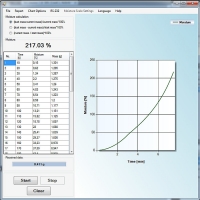
Once launched, the program resides in the computer's memory without performing any actions or interfering with the launch of other programs. To enter weighing results into a spreadsheet, simply connect the scale to your computer's RS232C serial port or Ethernet, launch ProCELL, open the spreadsheet, and click the scale's transfer button. Subsequent weighing results will be displayed in a column or row of the sheet.
Application: production and control stations supporting research and development work.
When connecting via RS232C interface, a cable is required.
If your computer does not have an RS232C interface, you must also purchase an active RS232C-USB adapter (available at computer stores).
If both the scale and the computer have a USB interface, a USB Type B to Type A cable is required.